Removed Chrome Flags 2026: What Replaced Them
If you followed a "best Chrome flags" list and half the flags were not there, the list was stale. Chrome retires experiments on a schedule: every flag carries an expiry milestone, disappears from the page when that milestone passes, and is deleted from the code shortly after. Nothing about the flags page tells you a flag ever existed — a removed flag looks exactly like a typo.
I dumped every experiment on the flags page in Chrome 151.0.7922.138 (August 2026) — 569 in total, 542 available on macOS and 27 in the Unavailable tab — and checked the well-known flags from popular roundups against that list. 22 of them are gone. Below is each one, what actually happened to it, and where the feature lives now.
How to Tell a Removed Chrome Flag From a Typo
Search the flags page for the flag's name or ID. A removed flag gives you this:
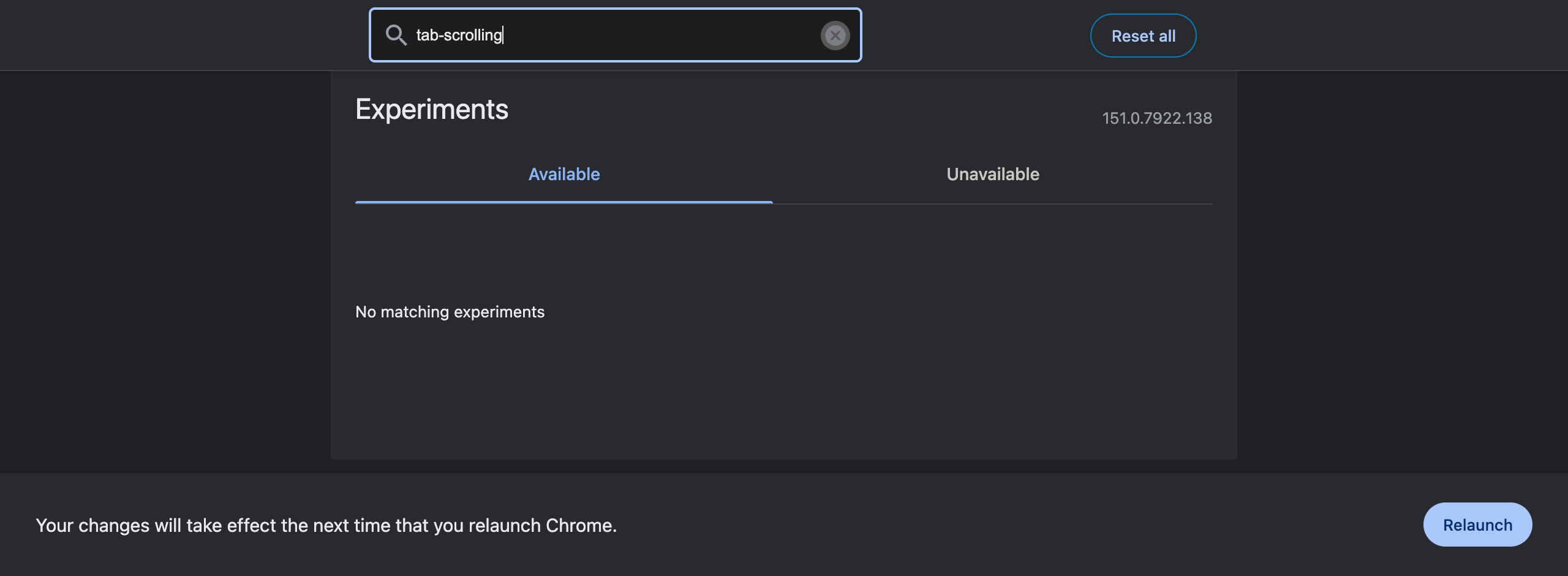
Two checks before you conclude anything:
- Check the Unavailable tab. The flag may exist and simply not apply to your OS. Search "scrolling" with the Unavailable tab selected and Smooth Scrolling appears with "Not available on your platform" — it is alive on Windows, Linux, ChromeOS and Android, absent on macOS. That is a platform restriction, not a removal.
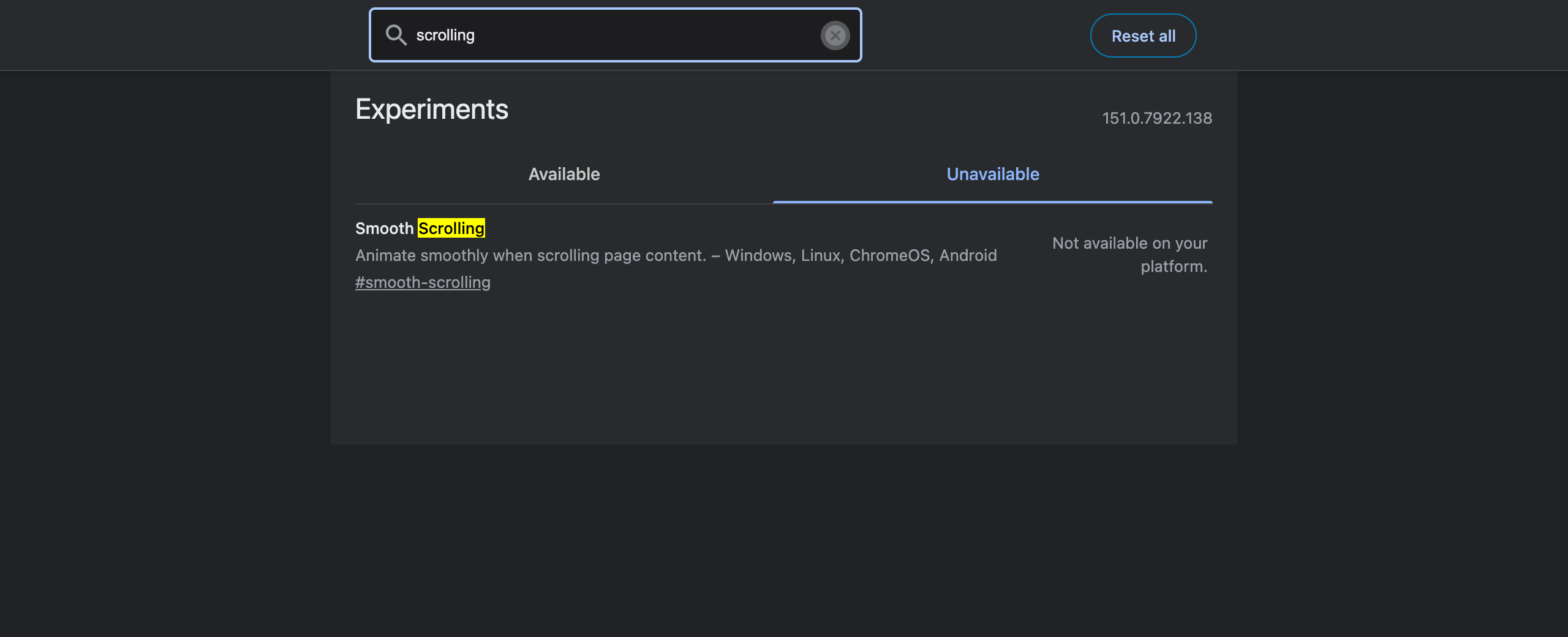
- Paste the permalink.
chrome://flags/#some-flag-idnormally opens the page with that flag highlighted in yellow. If the page opens with nothing highlighted, that ID does not exist in your build.
Do both and you have a definitive answer for your Chrome version, which is the only version that matters.
The Expiry Machinery: Chrome's Two "Unexpire" Flags
The retirement process is visible at the very top of the flags list. Chrome 151 ships two entries whose entire purpose is to resurrect flags that already expired:
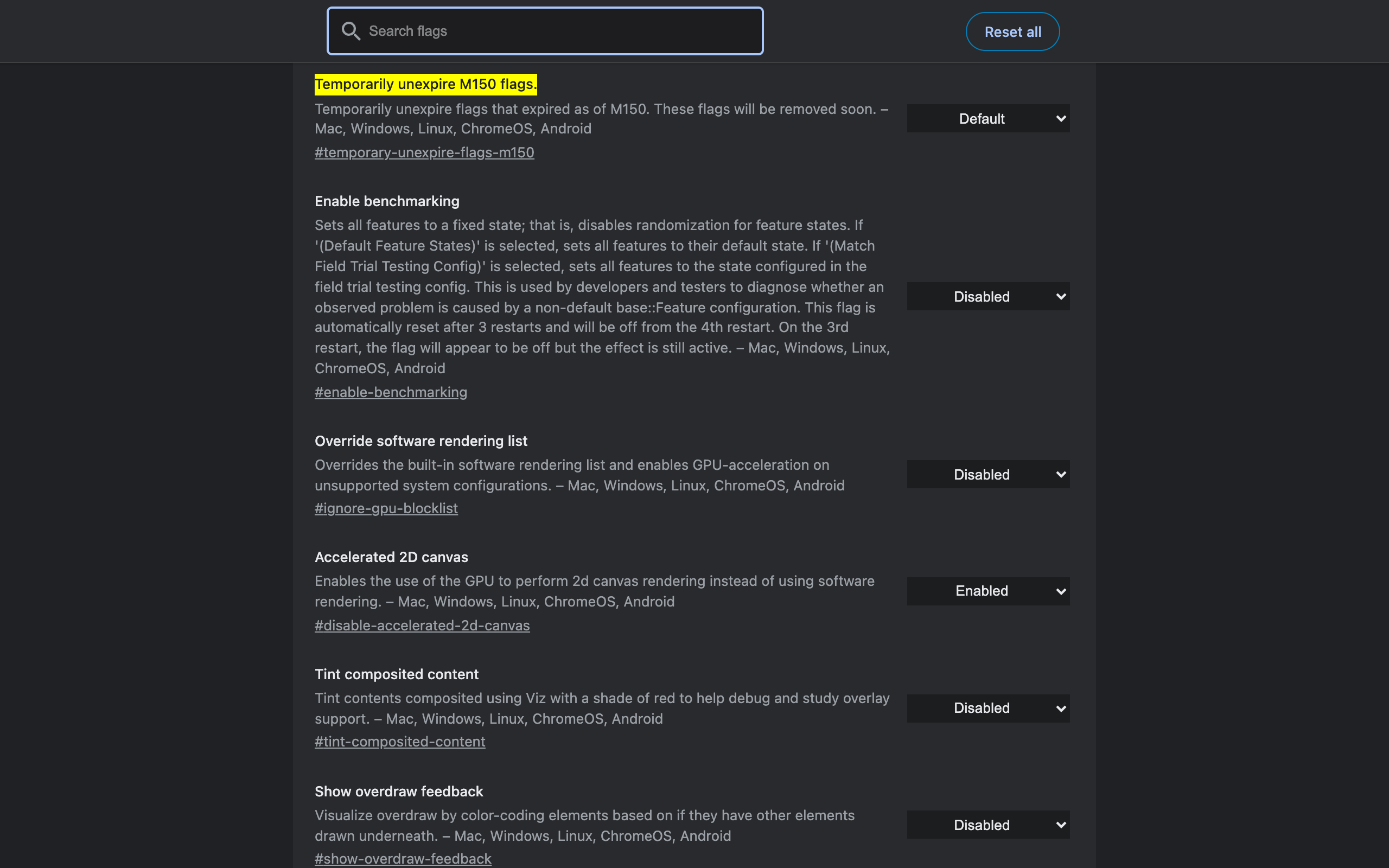
chrome://flags/#temporary-unexpire-flags-m149— "Temporarily unexpire flags that expired as of M149. These flags will be removed soon."chrome://flags/#temporary-unexpire-flags-m150— same for M150.
That is Chrome telling you the rule in its own words. Flags are tagged with a milestone; when Chrome passes it, they vanish from the page; for roughly two milestones you can bring them back with the unexpire switch; after that they are deleted from the source. Since Chrome ships a stable release about every four weeks, a flag list written six months ago is two or three milestones out of date by definition.
If a flag you need went missing recently, try enabling the M149 or M150 unexpire flag and relaunching — it may come back for one more release. Treat that as a migration window, not a fix.
22 Removed Chrome Flags and Their Replacements
Every flag in the left column returned "No matching experiments" in Chrome 151. The right column is where the functionality went.
| Removed flag | What happened | Where it is now |
|---|---|---|
#scrollable-tabstrip, #tab-scrolling | Abandoned | No toggle. #vertical-tabs and #tab-strip-declutter are the current answers |
#tab-hover-cards, #tab-hover-card-images | Graduated | chrome://settings/performance → "Tab hover preview card appearance" |
#high-efficiency-mode-available | Graduated | chrome://settings/performance → Memory Saver |
#battery-saver-mode-available | Graduated | chrome://settings/performance → Energy Saver |
#memory-saver-multi-state-mode | Graduated | Memory Saver settings plus "Always keep these sites active" exceptions |
#tab-groups, #tab-groups-collapse, #tab-groups-auto-create | Graduated | Tab groups are standard; only refinements like #tab-group-hover-cards remain as flags |
#reader-mode, #enable-reader-mode | Graduated | Reading Mode in the side panel; only extras such as read-aloud phrase highlighting are still flags |
#read-later, #reading-list | Graduated | Reading list in the side panel |
#global-media-controls | Graduated | The media button in the toolbar |
#back-forward-cache | Default | On by default, no toggle |
#enable-lazy-image-loading, #enable-lazy-frame-loading | Default | Native loading="lazy" in the web platform |
#password-import, #password-export | Moved | chrome://password-manager/settings (Google Password Manager) |
#privacy-sandbox-settings-4, #privacy-sandbox-ads-apis | Page removed | chrome://settings/adPrivacy no longer resolves either; third-party cookie controls live at chrome://settings/cookies |
#enable-heavy-ad-intervention | Graduated | Intervention is standard; only #heavy-ad-privacy-mitigations remains |
#dark-mode-toggle, #darken-websites-checkbox-in-themes-setting | Replaced | #enable-force-dark — Auto Dark Mode for Web Contents |
#side-by-side, #split-view | Graduated | Split view shipped; refinements like #split-view-horizontal and #split-view-link-open remain as flags |
#enable-portals | Abandoned | Prerendering won instead — #prerender2 |
#enable-first-party-sets | Graduated | Shipped as Related Website Sets, no toggle |
#enable-lens-standalone, #lens-overlay | Graduated | Google Lens is in the right-click menu and toolbar |
#customize-chrome-side-panel, #side-panel-journeys | Graduated | Standard side panel entries |
#chrome-labs, #chrome-refresh-2023 | Finished | The redesign shipped; Labs was retired |
#enable-native-notifications, #system-notifications | Default | Chrome uses OS notifications by default |
Two patterns explain almost every row. Good flags graduate: they become settings, or they become the default and lose their switch. Bad flags evaporate: Portals lost to prerendering, tab scrolling lost to vertical tabs, Chrome Labs was retired. Either way the flag disappears — which is why a flag's absence is usually good news, not lost functionality.
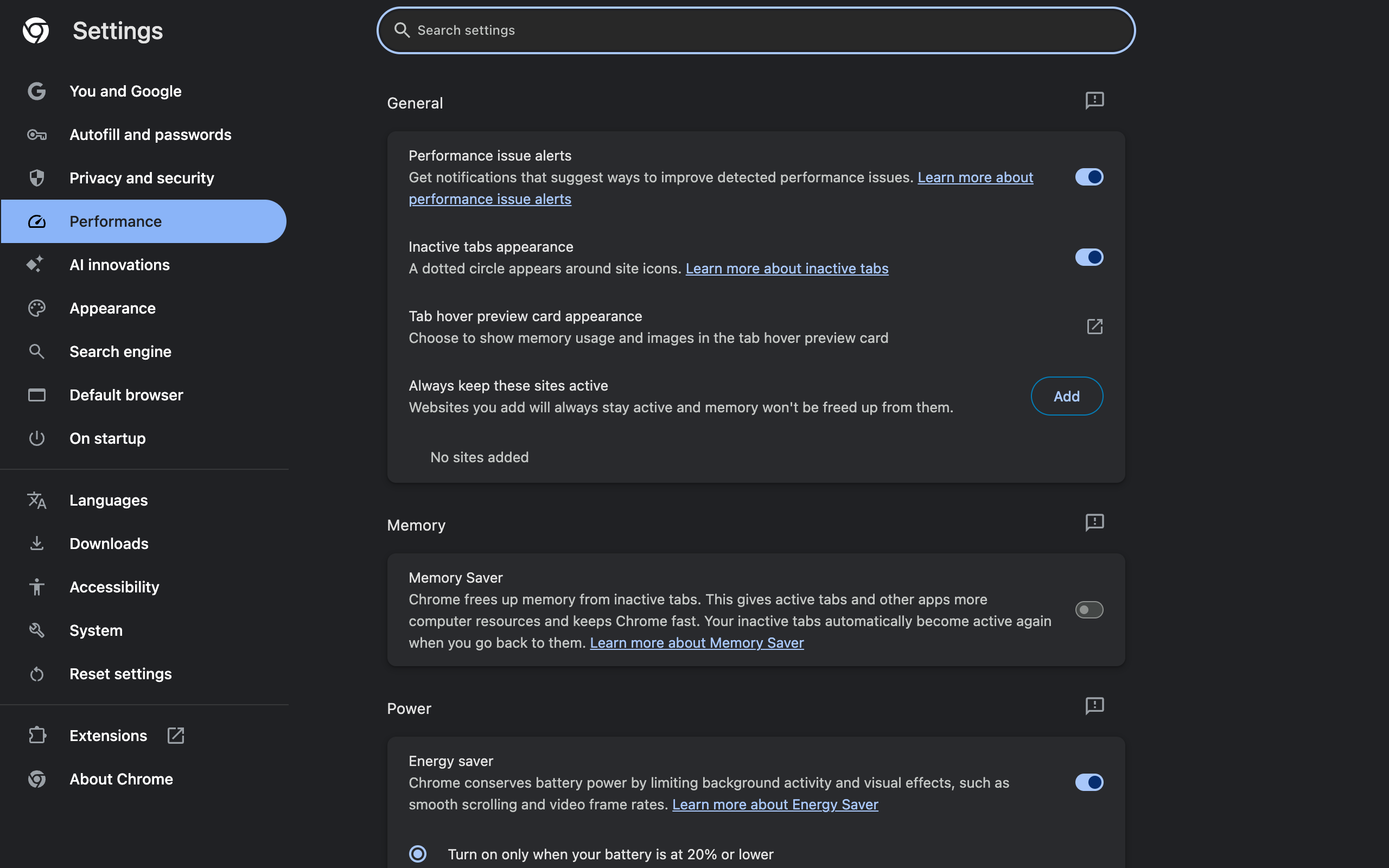
The single biggest destination is chrome://settings/performance. Everything the old memory and battery flags used to gate is a normal setting there now:
Renamed, Not Removed: The Built-In AI Flags
One group deserves separating out, because searching for the old names makes them look deleted when they are not. Chrome's on-device AI flags dropped their "for Gemini Nano" suffixes:
| Old flag ID | Chrome 151 equivalent |
|---|---|
#prompt-api-for-gemini-nano | #prompt-api |
#summarization-api-for-gemini-nano | #summarizer-api |
#writer-api-for-gemini-nano | #writer-api |
#rewriter-api-for-gemini-nano | #rewriter-api |
#enable-gemini-nano | No direct equivalent; chrome://settings/ai holds the user-facing controls |
| — (new) | #proofreader-api |
Each of the surviving API flags now offers a four-way dropdown — Default, Enabled, Enabled Multilingual, Disabled — which is new and easy to miss if you copy an old instruction that says "set it to Enabled". The user-facing side has its own settings page: chrome://settings/ai, titled "AI innovations", which states plainly that "Data sent to Google may be seen by human reviewers to improve Chrome AI's technology". Worth reading before you turn things on.
Chrome's Gemini integration also appears in the flag list under the internal name "glic" — dozens of entries, all experimental, none of which you should enable casually. That is a topic of its own.
The Flags That Are Still There (And Still Worth It)
Removals get the attention, but the useful core has been stable for years. In Chrome 151 all of these are present and working:
| Flag | Still there? | Note |
|---|---|---|
#enable-parallel-downloading | Yes | Measurably faster large downloads — tested here |
#vertical-tabs | Yes | Plus #vertical-tabs-expand-on-hover |
#tab-strip-declutter | Yes | The successor to tab scrolling |
#enable-force-dark | Yes | Forced dark mode on every site |
#enable-gpu-rasterization | Yes | Check chrome://gpu before forcing it |
#enable-quic | Yes | Modern transport, on by default in most builds |
#ignore-gpu-blocklist | Yes | Only if you know why your GPU was blocklisted |
The full annotated set, with screenshots and verdicts, is in Chrome flags useful settings — that post is refreshed against each Chrome release for exactly the reason this one exists.
How to Keep Your Own Flag List From Going Stale
A few habits, learned from maintaining a flags article across several Chrome releases:
- Record the flag ID, not the display name. Names get reworded between releases; IDs are what the permalink and the search box match on.
- Write down the Chrome version you verified against. "Works in 151" is useful information in six months. "Works" is not.
- Recheck after every stable update (roughly every four weeks). Paste your permalinks; anything that opens without a yellow highlight is gone.
- Prefer the setting over the flag once a feature graduates. Settings survive updates; flags are designed not to.
- Suspect any list without a version number. If an article recommends
#tab-scrolling,#read-lateror#global-media-controlstoday, it was not tested this year.
For the wider question of what these experiments can actually break — and which ones genuinely deserve the warning banner — see are Chrome flags safe. And if your goal behind all this flag hunting was a faster browser, how to speed up Chrome browser covers the settings that outperform any flag.
Frequently Asked Questions
Why has a Chrome flag disappeared from chrome://flags? Chrome flags expire. Every experiment is tagged with a milestone, and once that milestone passes the flag stops appearing and is later deleted from the code. Successful features graduate into normal settings or become the default; abandoned ones are simply removed.
How do I check whether a Chrome flag still exists? Type the flag name into the search box on chrome://flags. If you get "No matching experiments", check the Unavailable tab as well — the flag may exist but not apply to your operating system. If it appears in neither, it is gone from your build.
What happened to the tab scrolling flag in Chrome? Both scrollable-tabstrip and tab-scrolling are gone from Chrome 151. There is no replacement toggle. Vertical Tabs and Tab Strip Declutter are the current answers to a crowded tab strip.
Where did the Memory Saver and Battery Saver flags go? They graduated into chrome://settings/performance, where Memory Saver, Energy Saver, performance issue alerts, tab hover preview cards and a per-site exception list are all normal settings now.
What are the "Temporarily unexpire" flags at the top of chrome://flags? They are an escape hatch. Chrome 151 lists temporary-unexpire-flags-m149 and temporary-unexpire-flags-m150, which bring back flags that expired in those milestones. Chrome's own description warns those flags will be removed soon.
Did the Gemini Nano flags get removed from Chrome? They were renamed, not removed. The old prompt-api-for-gemini-nano style names are gone; Chrome 151 has prompt-api, summarizer-api, writer-api, rewriter-api and proofreader-api, plus an AI innovations page at chrome://settings/ai.
Is it a problem that Chrome removed a flag I was using? Usually not. Removal normally means the feature shipped and the toggle became unnecessary. When a flag disappears, look for the feature in chrome://settings before assuming you lost it.
The Takeaway
A flags list is a snapshot, not a reference. Of the flags that filled "best Chrome flags" articles a couple of years ago, most are gone from Chrome 151 — and in the majority of cases that is because they won: the feature is now a setting, or it is simply how Chrome behaves. The handful that vanished without a successor, like tab scrolling and Portals, lost to a better approach that is also worth knowing about.
So when a flag is missing, do not hunt for a workaround to restore it. Check chrome://settings first, check the Unavailable tab second, and treat the milestone number in the unexpire flags as the clock everyone writing about this topic is racing.
Some gaps in Chrome are not experiments waiting to graduate — they are gaps Chrome has never filled. Copying the current tab's URL with one keystroke is one of them, which is why Ctrl+Shift+C exists: one shortcut, URL on the clipboard, nothing to configure and nothing that expires with the next milestone.
Try Ctrl+Shift+C
Copy any URL with one keyboard shortcut. Free forever, no data collected.