Gemini in Chrome Guide: Enable, Disable, Side Panel (2026)
Gemini in Chrome is Google's AI assistant built into the browser: a Gemini button at the top of the window opens a chat panel that can read the tab you share with it, summarize it, answer questions about it and, on eligible accounts, act on pages for you. You turn it on by signing in to Chrome with an eligible Google Account and accepting the opt-in; you turn it off in Settings → AI innovations → Gemini in Chrome.
The catch is the word "eligible". Gemini in Chrome is gated by account, age, country and language, and Chrome will not tell you much when you fall outside the gate. So instead of a tour of a feature that may not exist on your machine, this guide maps what Chrome 154 (154.0.8037.93, macOS) actually ships: the settings, the internal pages, the policies and the flags — including what you see when you are not eligible, which I tested on a clean signed-out profile.
What Gemini in Chrome Is (and What It Is Not)
Inside Chrome the feature has an internal codename, glic. You will see it in chrome://glic, in policy names, and in 41 entries on the flags page. The settings row describes it as an "AI assistant that gives key takeaways, clarifies concepts, finds answers and more."
It is easy to confuse with two other things Chrome also calls AI:
| Feature | Where it runs | What it does | Where you control it |
|---|---|---|---|
| Gemini in Chrome | Google's servers | Chat panel that reads tabs you share | Settings → AI innovations → Gemini in Chrome |
| On-device AI (Gemini Nano) | Your computer | Scam detection, built-in AI APIs, writing help | Settings → AI innovations → On-device AI |
| AI Mode in Search | Google Search | Search answers in the address bar and new tab page | Settings → AI innovations → AI Mode and connected apps |
This post is about the first row. If your real goal is reclaiming disk space from the local model, that is a separate switch — covered in how to disable Gemini Nano and on-device AI in Chrome.
Who Can Use Gemini in Chrome
Google's help center lists the requirements. Paraphrased:
- Signed in to Chrome with a Google Account — it does not work in Incognito
- Age 13 or older (or the local minimum); some features, such as the microphone and auto browse, require 18+
- A supported country or region and one of the supported languages (Google lists 49)
- A Mac, a Windows PC or a Chromebook Plus, running the latest Chrome
- Work and school accounts only if the administrator has turned it on
I cannot test every combination of country and account type, and I will not pretend to. What I can show is how Chrome behaves when you are not eligible. On a fresh, signed-out Chrome 154 profile:
chrome://glicloads the Gemini panel page directly and shows "This account can't use Gemini — To use Gemini in Chrome, sign in with a different Google Account."chrome://settings/ai/geminisilently redirects to the main settings page. The Gemini in Chrome section simply does not render.chrome://skills(Skills in Chrome, which builds on Gemini) says "Skills aren't available — sign in to Chrome with a Google Account that has Gemini in Chrome enabled."- Chrome's own profile record in
Local Statemarks the test profileis_glic_eligible: false. On my everyday signed-in profile on the same Mac, the same key readstrue.
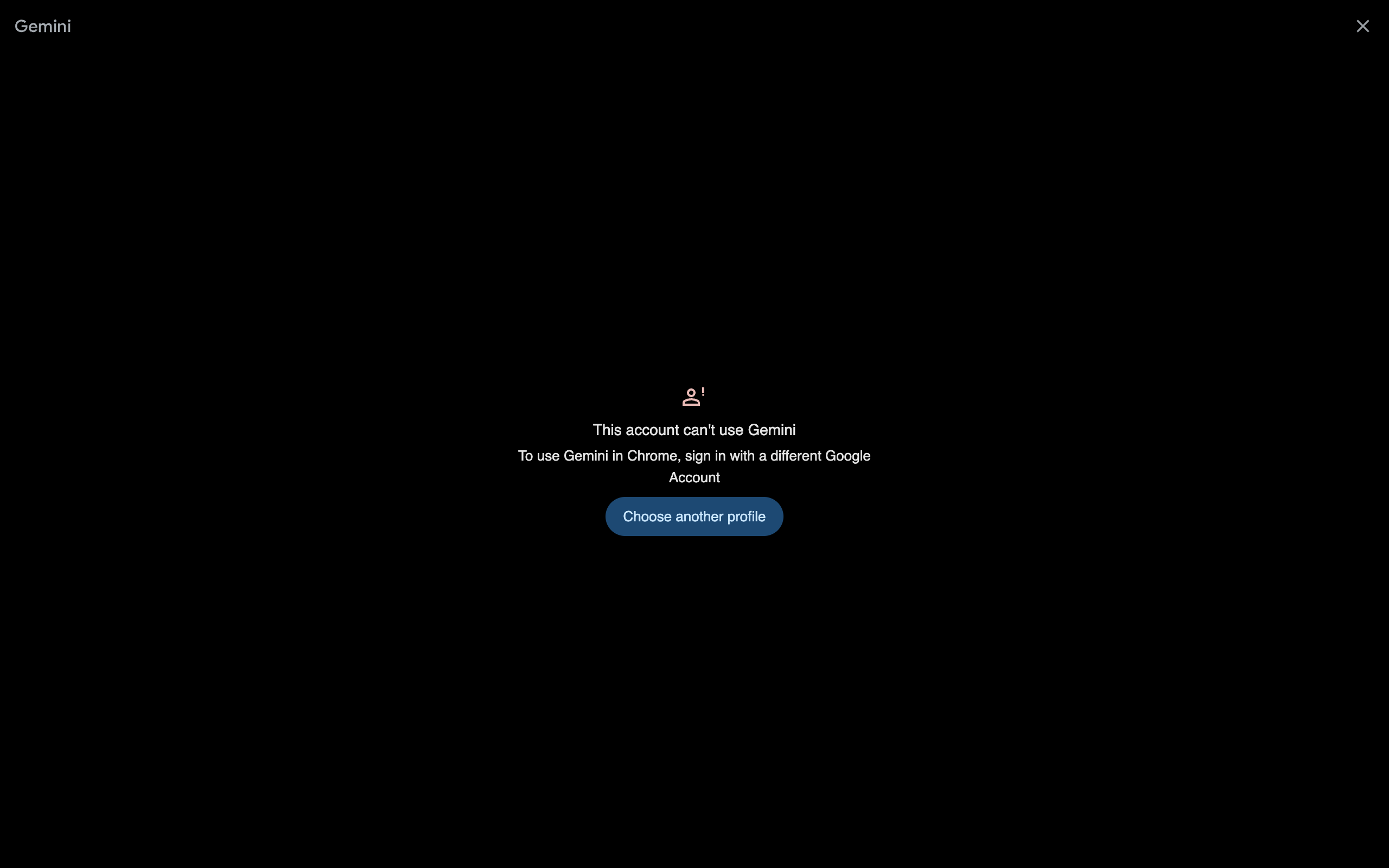
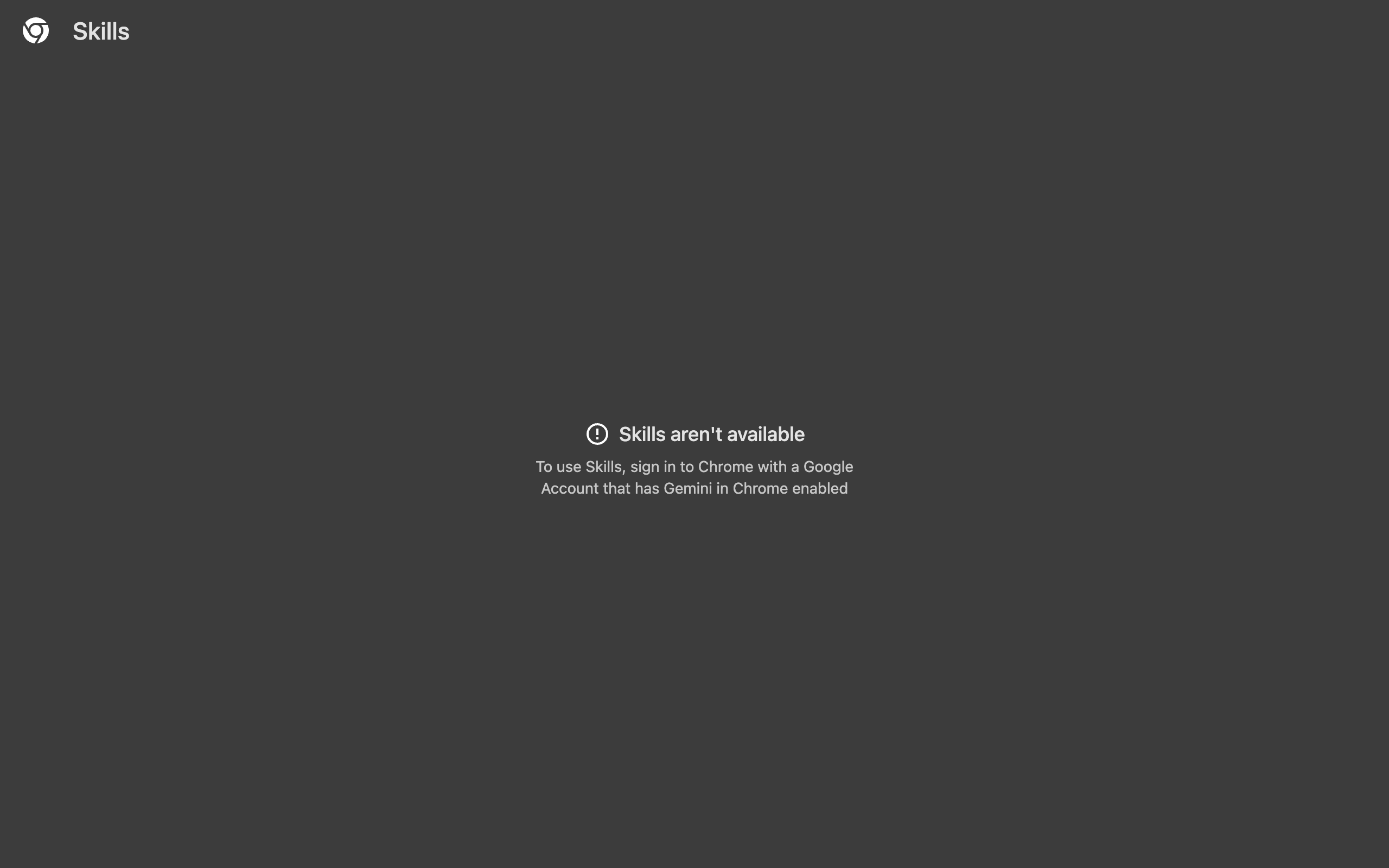
The panel page also contains the other error states it can show, which double as a troubleshooting list: "Your account doesn't have access to Gemini in Chrome", "Your organisation has turned off this feature", "Gemini in Chrome isn't available — Gemini in Chrome is expanding to different locations but isn't available everywhere", "Verify that it's you" and an offline message. If you hit one of those, the wording tells you which gate you failed.
How to Open Gemini in Chrome
Once you are eligible, there are three ways in:
- The Gemini button at the top of the browser window. Clicking it the first time runs the opt-in; afterwards it toggles the panel.
- The keyboard shortcut. Google's help documents Ctrl+G on Mac and Alt+G on Windows. In Chrome 154 the settings page also has "Keyboard shortcut" with Edit and Clear buttons, plus a scope switch between "In Chrome" and "Global" — so you can rebind it, or stop it firing outside Chrome.
- The Mac menu bar or Windows system tray. "Show Gemini in Chrome in Mac menu bar and turn on keyboard shortcut" gives you Gemini even when Chrome is minimized.
Chrome 154 has two more shortcuts in the same settings group: a navigation shortcut ("navigate between Gemini in Chrome and your open tab") and a selection shortcut ("select part of the screen"). There is also an optional "Shake cursor to select from screen" trigger, which was hidden on my test profile.
The panel itself lives where the side panel lives. A setting called "Keep browsing with Gemini when you open new tabs" keeps it open as you create new tabs instead of closing per tab.
Every Gemini in Chrome Setting in Chrome 154
I pulled these labels from Chrome 154's settings bundle (the strings the Gemini page renders), because a signed-out profile cannot open the page itself. US builds use the same wording with US spelling.
| Setting | What it does | My take |
|---|---|---|
| Show Gemini at the top of the browser | The Gemini button in the window | Turn off to hide Gemini without disabling it |
| Show Gemini in Chrome in Mac menu bar / system tray | Menu bar icon plus the OS-wide shortcut | Off unless you use Gemini outside Chrome |
| Keyboard shortcut (In Chrome / Global) | Opens the panel; editable | Set to "In Chrome" to avoid clashes |
| Page content sharing | "Shares the current tab with Gemini, even as you switch tabs" | Off is the privacy-conservative choice |
| Share current tab by default | Current tab is attached to every new chat | Convenient; means every chat starts with a page upload |
| Precise location | Shares exact location for local answers | Off unless you ask local questions |
| Microphone | Voice chat; audio stored in Gemini Apps activity if on | Your call; 18+ only |
| Media understanding | Answers about video or audio you played on some sites | On by default, per Google |
| Let Chrome browse for you (auto browse) | Gemini acts in your tabs to complete tasks | Read the warnings below first |
| Keep browsing with Gemini when you open new tabs | Panel follows you to new tabs | Preference |
| Closed captioning | Captions during Gemini Live | Preference |
| Instructions for Gemini / Personal context | Custom instructions and what Gemini may use about you | Review once |
| Gemini Apps activity | Link to myactivity.google.com for Gemini history | Where you delete chats |
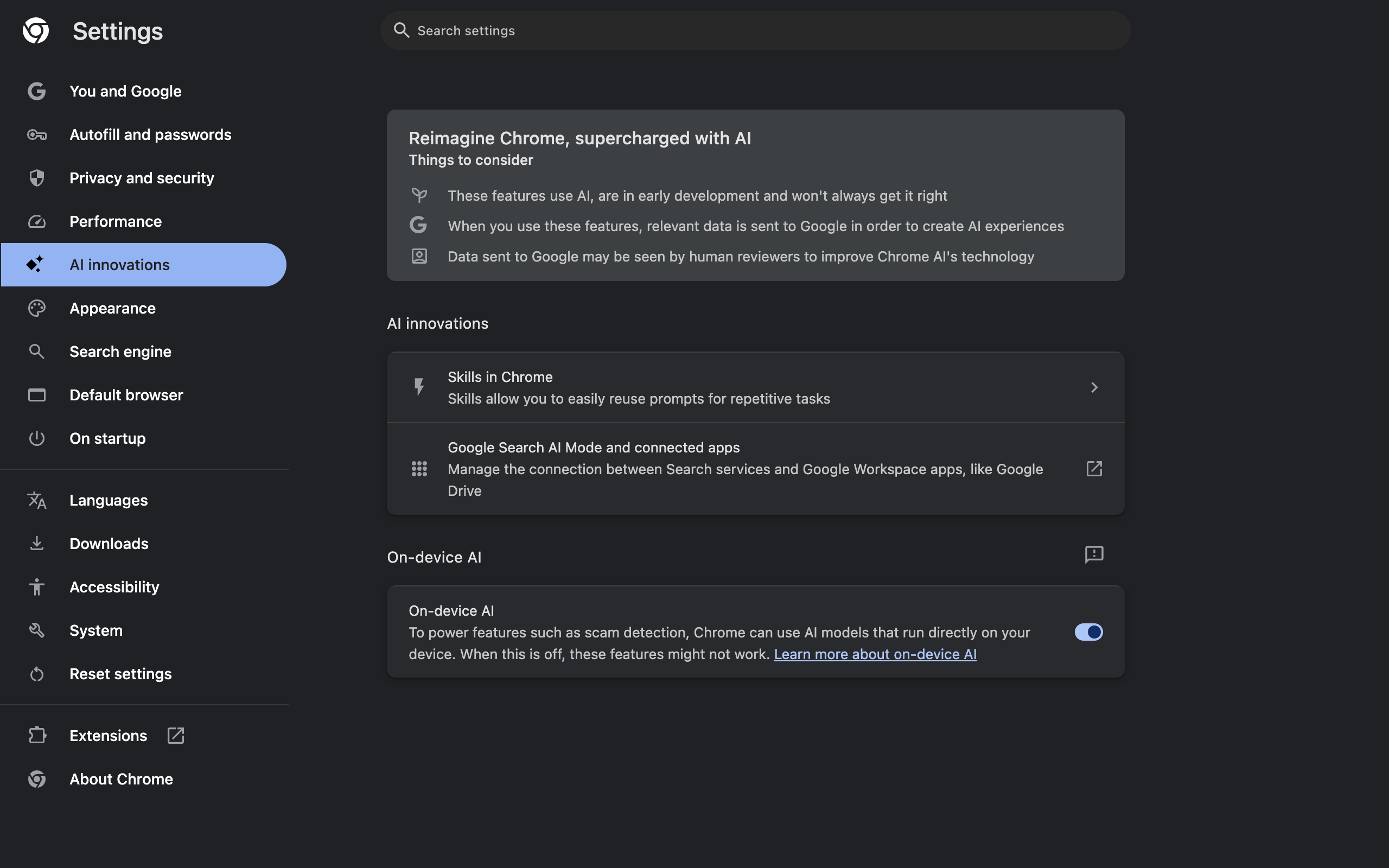
The AI innovations page that hosts all of this opens with three "Things to consider", verbatim: features "are in early development and won't always get it right", "relevant data is sent to Google in order to create AI experiences", and "Data sent to Google may be seen by human reviewers to improve Chrome AI's technology". On my signed-out profile it showed only Skills in Chrome, AI Mode and connected apps, and On-device AI; rows for History search, Help me write, Select text to ask Gemini, Talk to type, Try it on and Automated password change existed in the page but stayed hidden.
What Gemini in Chrome Sends to Google
This is the part worth reading slowly, and Chrome's own strings are direct about it:
- "When you choose to share the current tab with Gemini, the tab's full content, media and URL are sent to Google."
- "When tabs are shared, their page contents, media and URLs are sent to Google and may be reviewed for safety."
- "Conversations about shared tabs may be seen by human reviewers to improve Gemini."
- "Tabs opened from a chat or a shared tab are also shared with Gemini."
That last line is easy to miss: sharing propagates. Google's help adds that you can share up to 10 open tabs. For a managed account, the settings show a variant that says "Your data is not used to improve generative AI models" — the data-protected mode Workspace and enterprise customers get.
Practical rule: do not share a tab that holds something you would not paste into a chat window — an internal dashboard, a medical portal, an inbox. For the wider habit of auditing what browser tools can see, the same thinking applies as in privacy-focused Chrome extensions.
Auto Browse and Gemini Spark: The Agent Features
Chrome 154 ships the strings for two agent features, both of which were switched off on my test profile:
Let Chrome browse for you. "Gemini in Chrome uses auto-browse to work in your tabs and complete tasks that you give it" — booking appointments, building shopping baskets. Chrome promises that "Gemini shows its steps and tries to confirm before taking sensitive ones. You can stop or take over at any time." A related page lists "Sites that Gemini can sign you in to", where you can revoke each one.
Gemini Spark. A more autonomous agent that "can use Chrome auto browse on this device to interact with sites and complete tasks on your behalf". Chrome's own warnings here are the bluntest text in the whole settings bundle: Spark "will have access to the same sites as you, including the sites that you're signed in to", "Anybody with access to your Gemini Spark agent could control your Chrome browser", and it "is experimental and may do things like share your info or make purchases without asking."
If you enable either one, treat it like giving someone your unlocked laptop with a to-do list. And do not touch the flag #glic-disable-actor-safety-checks — its description reads "Disables actor safety checks in Glic. Use with extreme caution, intended for testing only." That belongs on the same shelf as the flags in are Chrome flags safe.
How to Turn Off Gemini in Chrome
Pick the level you need.
Hide it (keep it available): Settings → AI innovations → Gemini in Chrome → turn off "Show Gemini at the top of the browser". The button disappears; nothing else changes.
Kill the global shortcut: in the same section, turn off the Mac menu bar / Windows system tray toggle, or clear the keyboard shortcut.
Stop page sharing: turn off "Page content sharing" and "Share current tab by default". Gemini then sees only what you type.
Delete history: "Gemini Apps activity" links to myactivity.google.com/product/gemini.
Disable it for a machine or an organization (policy):
| Policy | Values | Platforms (per Chromium's policy definitions) |
|---|---|---|
GeminiSettings | 0 = allowed, 1 = Gemini integration not available | Windows and Mac from Chrome 137, ChromeOS 144 |
GenAiDefaultSettings | 0 = allow and improve models, 1 = allow without improving models, 2 = disable | Cloud-only (Google Admin console) |
GeminiSettings is the one for a single family PC or a small office: a registry value on Windows (HKLM\SOFTWARE\Policies\Google\Chrome, DWORD GeminiSettings = 1) or a configuration profile on Mac. When an admin sets it, Chrome shows "This feature is disabled by your organisation" in settings. I did not apply the policy on this Mac, because policies apply to every Chrome profile on the machine, including my working browser.
About the flag: chrome://flags/#glic exists with Default / Enabled / Disabled. Flags are not a supported way to manage a shipped feature and get removed without notice — a pattern documented in removed Chrome flags in 2026. Use the settings or the policy.
The 41 Glic Flags in Chrome 154
Of the 627 entries on Chrome 154's flags page, 41 belong to glic — #glic itself plus 40 glic- sub-flags — and there is a separate #geic-enabled for Gemini Enterprise. A few are worth knowing about, none worth enabling casually:
#glic-tab-groups— Gemini integration with tab groups#glic-pdf-summarize— the PDF "Summarize" button#glic-capture-region— capture a screen region into a chat#glic-hotkey-local-scope— limits the global hotkey to the active window#glic-toolbar-button-location— where the Gemini button sits
The rest are rollout plumbing: accessibility fixes, first-run variants, enterprise test overrides. None of them make Gemini appear on an ineligible account — eligibility is decided on Google's side. For the flags that do pay off, start with the tested list in Chrome flags useful settings.
Is Gemini in Chrome Worth Turning On?
It earns its place on long pages you need to interrogate: a 40-page PDF, a dense spec, a product page with fifty reviews. It is a worse deal for pages that hold private data, because the default flow is to upload the tab. My setup: button on, "Share current tab by default" off, location off, auto browse off. That keeps Gemini one click away while making every upload a deliberate choice.
Frequently Asked Questions
How do I turn on Gemini in Chrome? Sign in to Chrome with an eligible personal Google Account on Mac, Windows or a Chromebook Plus, update Chrome, then click the Gemini button at the top of the browser and accept the opt-in. If there is no button, your account, region, language or age is not eligible yet.
Why does Chrome say this account cannot use Gemini? Gemini in Chrome is gated by account eligibility. In my Chrome 154 test on a signed-out profile, chrome://glic showed "This account can't use Gemini" and the Gemini settings section was hidden. Signing in with an eligible account in a supported country and language is the fix; work and school accounts need their admin to allow it.
How do I remove the Gemini button from Chrome? Open Settings, then AI innovations, then Gemini in Chrome, and turn off "Show Gemini at the top of the browser". To also remove the global keyboard shortcut on a Mac, turn off "Show Gemini in Chrome in Mac menu bar and turn on keyboard shortcut".
What is the keyboard shortcut for Gemini in Chrome? Google documents Ctrl+G on Mac and Alt+G on Windows, available after you turn on the menu bar or system tray option. Chrome 154 also lets you edit or clear the shortcut and choose whether it works only in Chrome or globally.
Does Gemini in Chrome read my tabs? Only what you share. When you share the current tab, Chrome says the full page content, media and URL are sent to Google, and conversations about shared tabs may be reviewed by humans. "Share current tab by default" and "Page content sharing" control how automatic that is.
Can an administrator disable Gemini in Chrome? Yes. The GeminiSettings policy set to 1 turns the integration off on Windows and Mac (Chrome 137 and later). Google Admin console customers can also set GenAiDefaultSettings to 2, which disables covered generative AI features by default.
Is Gemini in Chrome the same as Gemini Nano? No. Gemini in Chrome is a cloud assistant in the side panel that sends shared content to Google. Gemini Nano is an on-device model Chrome downloads for features such as scam detection and the built-in AI APIs. They have separate settings.
Gemini reads the whole page when you hand it over. Sometimes all you want to hand anyone is the link. Ctrl+Shift+C copies the current tab's URL with one shortcut — no page content read, nothing sent anywhere, no data collected.
Try Ctrl+Shift+C
Copy any URL with one keyboard shortcut. Free forever, no data collected.