Disable Gemini Nano in Chrome: Delete the 4 GB AI Model
To disable Gemini Nano in Chrome, open Settings → AI innovations and turn off On-device AI. That one switch stops Chrome from using its local AI model, and Google says it deletes the model files and will not download them again while the setting stays off. On my Mac that model was a single 4.0 GB file.
The rest of this post is the part other guides skip: where the model actually lives, how big it is, what the flags and policies really do (I tested the flags; they do not do what most people assume), and how to confirm the space came back. Everything below was checked on Chrome 154.0.8037.93 on macOS, using a throwaway profile for anything that changes state, and read-only inspection of my everyday Chrome for the disk numbers.
What "On-Device AI" Means in Chrome 154
Chrome has two unrelated families of AI features, and the switches do not overlap:
- Cloud AI — Gemini in Chrome, AI Mode, Help me write. Your input goes to Google. That side is covered in the Gemini in Chrome guide.
- On-device AI — a language model Chrome downloads and runs locally. Internally it is the "Optimization Guide On Device Model"; the base model in my copy is named
v3Nano, which is Gemini Nano.
The settings page describes the local side like this: "To power features such as scam detection, Chrome can use AI models that run directly on your device. When this is off, these features might not work." Google's help page lists help with writing or rephrasing text, scam warnings, summarizing web pages and organizing tabs. The same model also backs the built-in AI APIs that websites can call — the Prompt API, Summarizer, Writer, Rewriter and Proofreader.
chrome://on-device-internals shows the full list of use cases Chrome 154 tracks. On my test profile it listed, among others, scam_detection, prompt_api, summarizer_api, writing_assistance_api and proofreader_api — plus Gemma 4 variants (prompt_api_gemma4_4b, summarizer_gemma4_12b and so on), because Chrome 154 can fetch Gemma 4 models as well as Nano.
How Much Disk Space Gemini Nano Uses
Here is what I found in my everyday Chrome's data folder, measured with du and ls:
| Folder (in the Chrome user data directory) | Size on my Mac | What it is | Safe to remove via setting? |
|---|---|---|---|
OptGuideOnDeviceModel/2025.8.8.1141/ | 4.0 GB (weights.bin = 4,269,932,544 bytes) | Gemini Nano weights | Yes — On-device AI toggle |
SODALanguagePacks/ | 194 MB | Speech recognition language packs | No — Live Caption uses it |
optimization_guide_model_store/ | 71 MB | Small task models (classifiers) | Leave alone |
SODA/ | 50 MB | Speech recognition engine | No — Live Caption uses it |
WasmTtsEngine/ | 22 MB | Read-aloud voice engine | No — Reading mode uses it |
OnDeviceHeadSuggestModel/ | 7.6 MB | Address-bar suggestion model | Leave alone |
The 4.0 GB file dwarfs everything else. Two details matter:
- It is shared, not per profile. The folder sits at the root of the user data directory, next to the profile folders. My Chrome has eight profiles and exactly one copy of the model. Deleting it in one profile's settings affects all of them — consistent with the toggle being stored in
Local State(browser-wide) asoptimization_guide.on_device_foundational_model_user_settings, which I watched flip tofalsewhen I turned the switch off. - It arrives automatically. The folder's timestamp on my machine is 19 July. Chromium's policy definition is explicit that when the policy is unset, "the model is downloaded automatically" once the device meets the criteria below — there is no download prompt.
Paths per platform:
- macOS:
~/Library/Application Support/Google/Chrome/OptGuideOnDeviceModel(verified) - Windows:
%LOCALAPPDATA%\Google\Chrome\User Data\OptGuideOnDeviceModel(standard user-data location; not tested on Windows) - Linux:
~/.config/google-chrome/OptGuideOnDeviceModel(standard location; not tested)
The Requirements Chrome Checks Before Downloading
chrome://on-device-internals → Broker State shows the exact gates. On my test profile:
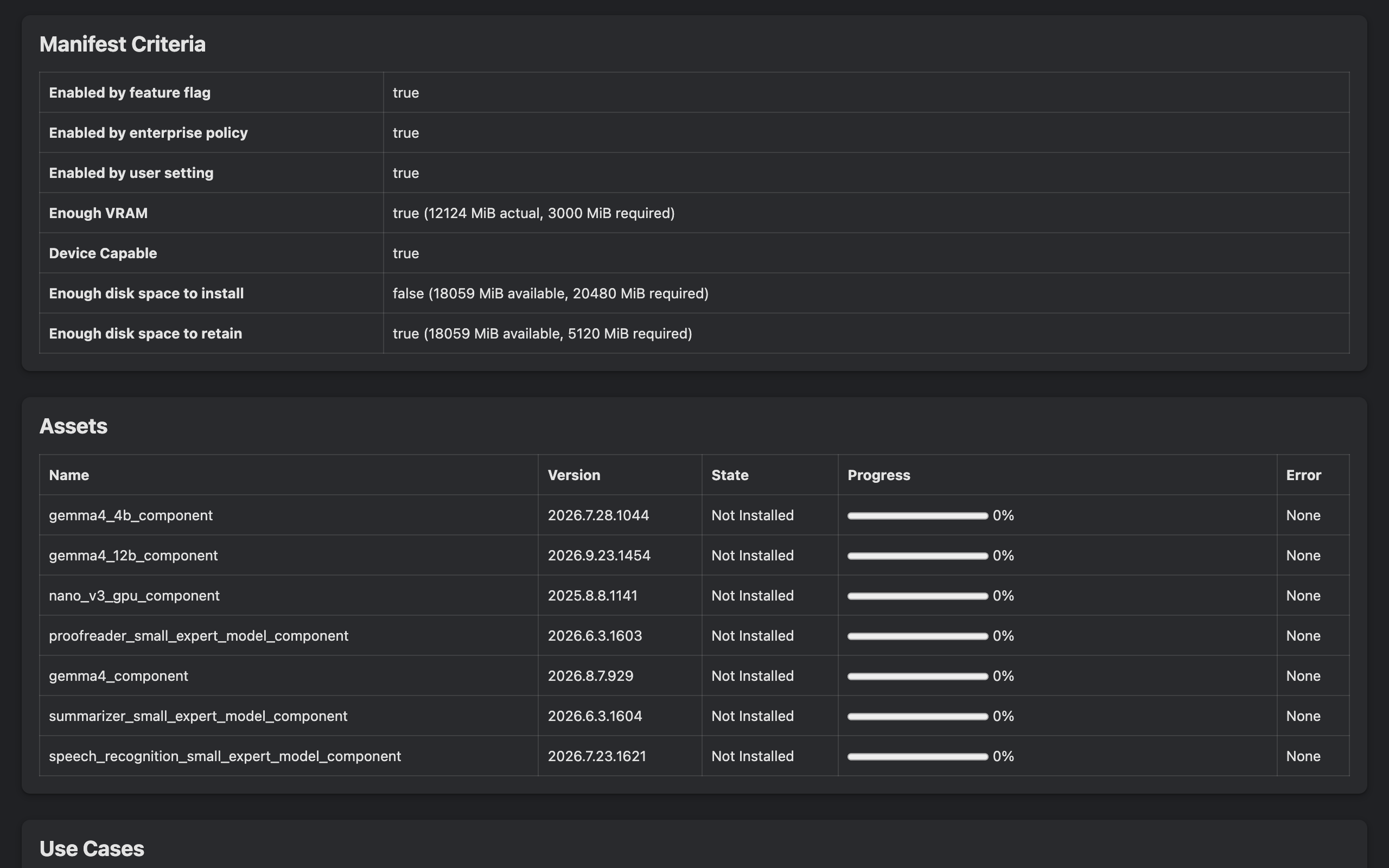
- Enabled by feature flag / enterprise policy / user setting — three independent switches; all must be true
- Enough VRAM — 12,124 MiB actual, 3,000 MiB required
- Device Capable — true
- Enough disk space to install — false (18,059 MiB available, 20,480 MiB required)
- Enough disk space to retain — true (5,120 MiB required)
So the download needs 20 GiB free; keeping an installed model needs 5 GiB free. The Assets table on the same page listed seven downloadable components — nano_v3_gpu_component (version 2025.8.8.1141, the same version as the 4 GB folder on my main profile), three Gemma 4 components, and small "expert" models for proofreading, summarizing and speech recognition — all "Not Installed" because my test profile fell short of the 20 GiB requirement.
Note that the page is hidden by default. If you see "Internal debugging pages are currently disabled", open chrome://chrome-urls, click Enable internal debugging pages, and reload. More of these hidden pages are in the guide to Chrome internal pages.
Method 1: Turn Off On-Device AI in Settings
- Go to
chrome://settings/ai(Settings → AI innovations). - Under On-device AI, turn the toggle off.
- Restart Chrome, then check the
OptGuideOnDeviceModelfolder.
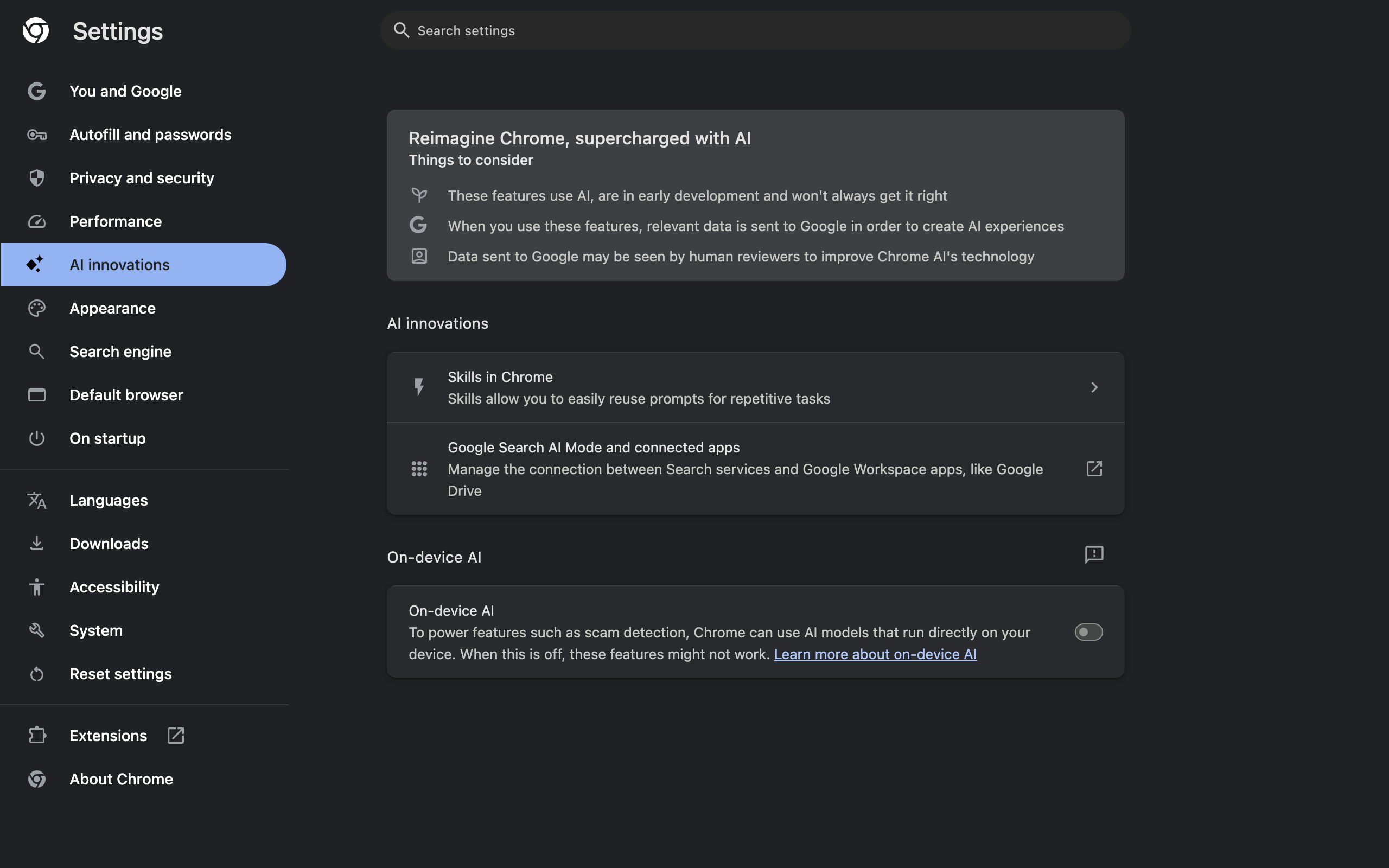
I tested what the toggle changes on a page that asks for the model. With On-device AI on, LanguageModel.availability() and Summarizer.availability() on example.com both returned "downloadable". With it off, both returned "unavailable", and the internals page switched "Enabled by user setting" to false. Turned back on, both returned to "downloadable".
What I did not do is flip the toggle on my everyday Chrome and watch the 4 GB disappear, because that would remove the model for all eight profiles on that installation. The deletion behavior comes from Google's help page: "Chrome will delete the on-device Generative AI model files from your device" and "will not download these models again while the setting is off." Check the folder afterwards; if it is still there after a restart, the next method is the hard stop.
Method 2: Enterprise Policies (The Hard Stop)
Policies win over the settings page and cannot be flipped back by a user. Three are relevant, quoted from Chromium's policy definitions:
| Policy | Value to block | Effect | Since | Scope |
|---|---|---|---|---|
GenAILocalFoundationalModelSettings | 1 (Disabled) | "the model will not be downloaded, and the existing model (if already downloaded) will be deleted" | Chrome 124 desktop | Whole browser |
BuiltInAIAPIsEnabled | false | Web pages calling the built-in AI APIs get an error | Chrome 137 | Per profile |
ComponentUpdatesEnabled | false | Also stops the model download — but blocks all component updates | — | Whole browser |
Use the first one. ComponentUpdatesEnabled = false is a sledgehammer: it also freezes the security-relevant components Chrome updates in the background, so I would not use it to save disk space.
How to set GenAILocalFoundationalModelSettings = 1:
- Windows: registry key
HKLM\SOFTWARE\Policies\Google\Chrome, DWORDGenAILocalFoundationalModelSettings=1. - macOS: a configuration profile (
.mobileconfig) for thecom.google.Chromedomain, installed via MDM or System Settings → Device Management. - Linux: a JSON file in
/etc/opt/chrome/policies/managed/containing{ "GenAILocalFoundationalModelSettings": 1 }.
Confirm at chrome://policy. Chrome 154 knows the policy (it appears under "Show policies with no value set"), and chrome://on-device-internals should then show "Enabled by enterprise policy: false". I did not apply it on this Mac, because a machine policy would also apply to my working browser.
There is also a cloud-only GenAiDefaultSettings for Google Admin console customers; value 2 disables covered generative AI features, but it targets cloud features like Gemini in Chrome and cannot be set with a local registry key or plist.
Why the AI API Flags Do Not Stop the Download
This is the misconception I wanted to test. Chrome 154 has chrome://flags/#prompt-api, #summarizer-api, #writer-api, #rewriter-api and #proofreader-api (renamed from the old "for Gemini Nano" names — see removed Chrome flags in 2026). The first three offer Default / Enabled / Enabled Multilingual / Disabled.
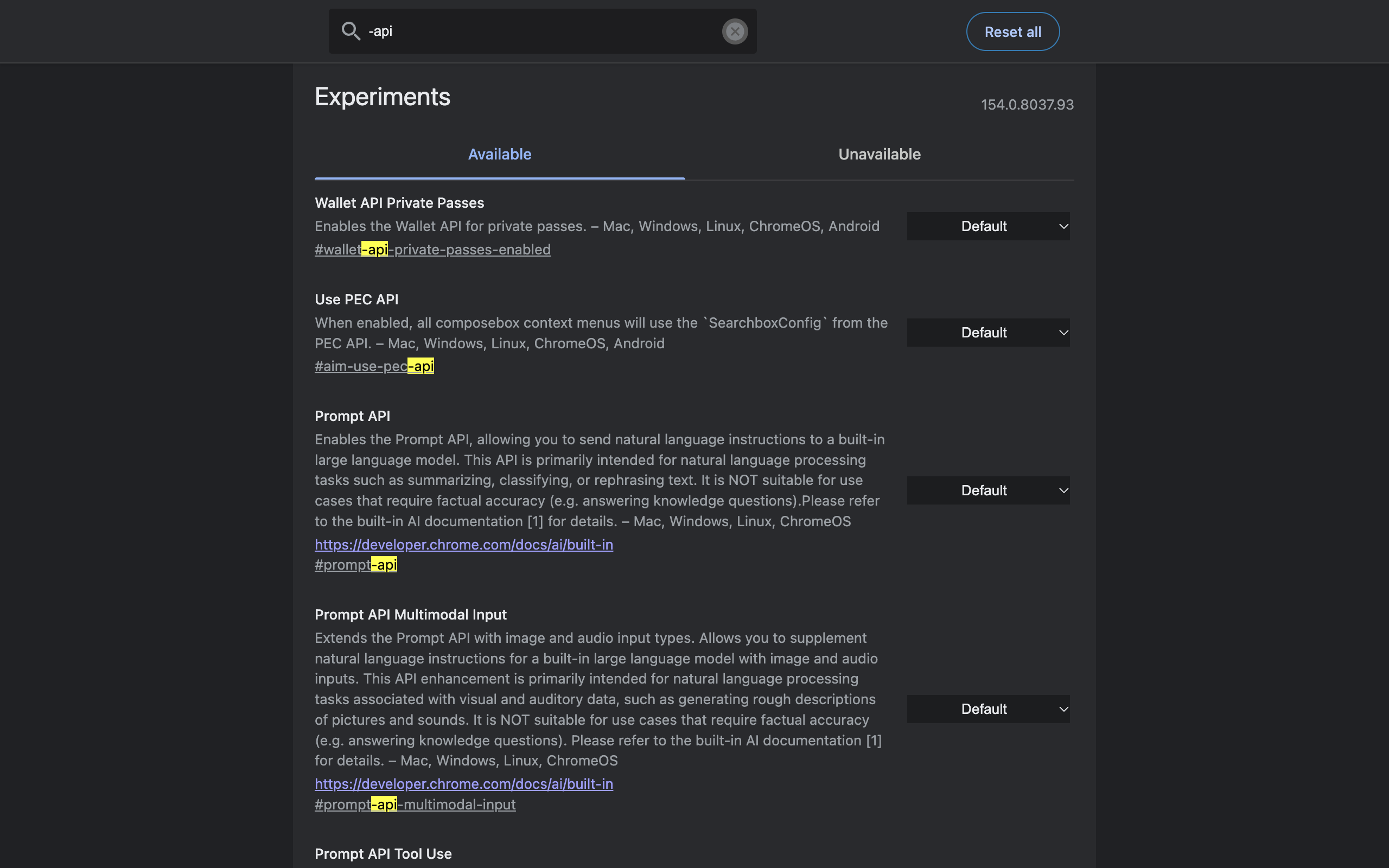
I set #prompt-api and #summarizer-api to Disabled and relaunched:
chrome://versionshowed--disable-features=AIPromptAPI,AISummarizationAPIbetween the flag markers.- On example.com,
LanguageModelandSummarizerwere now undefined — the APIs vanished from web pages entirely. - But
chrome://on-device-internalsstill read "Enabled by feature flag: true", withscam_detection,prompt_apiandsummarizer_apiall still listed as use cases.
So the API flags only hide the JavaScript interfaces. They do not tell Chrome to skip the model, because Chrome's own features (scam detection first among them) still want it. Two other observations from the default state: Writer, Rewriter and Proofreader were already undefined on stable Chrome 154, while Translator reported "downloadable" and LanguageDetector "available" — those two use separate, smaller models and are not affected by the On-device AI toggle in my test.
The general lesson about leaning on flags for a shipped feature is in Chrome flags useful settings: use settings for what has graduated, flags only for what has not.
Comparison: Every Way to Disable Chrome's On-Device AI
| Method | Stops download | Deletes existing model | Blocks web AI APIs | Survives user changes | I verified |
|---|---|---|---|---|---|
| Settings → On-device AI off | Yes | Yes (per Google) | Yes (model unavailable) | No | API state + internals flip |
GenAILocalFoundationalModelSettings = 1 | Yes | Yes (per policy docs) | Yes | Yes | Policy present in Chrome 154 |
BuiltInAIAPIsEnabled = false | No | No | Yes | Yes | Policy present in Chrome 154 |
| API flags set to Disabled | No | No | Only the disabled ones | No | Yes — model still enabled |
| Delete the folder by hand | No | Temporarily | No | No | Logic of the internals criteria |
ComponentUpdatesEnabled = false | Yes | No | No | Yes | Not recommended |
Should You Disable It?
Disable it if you are short on disk (a 256 GB laptop gives up 4 GB for a model you may never call), if you manage machines and want predictable footprints, or if you simply do not want a local LLM you did not ask for. Keep it if you value Chrome's on-device scam detection, or if you build with the built-in AI APIs. The privacy case is actually weaker than people assume: on-device inference is the part of Chrome's AI that, by design, keeps the text local. The cloud features are where page content leaves your machine.
Whichever you choose, take a look at chrome://on-device-internals after each Chrome release. In 154 the asset list already includes three Gemma 4 components alongside Nano, and the list only grows.
Frequently Asked Questions
How do I disable Gemini Nano in Chrome? Open Settings, go to AI innovations, and turn off On-device AI. Google says Chrome then deletes the on-device model files and will not download them again while the setting is off. In Chrome 154 the switch is browser-wide, not per profile.
How big is the Gemini Nano model in Chrome? On my Mac the model folder held a single weights.bin of 4,269,932,544 bytes, about 4.0 GB on disk, for model version 2025.8.8.1141. Chrome refuses to start the download unless 20,480 MiB of disk space is free.
Where is the Chrome AI model stored? In a folder called OptGuideOnDeviceModel at the root of the Chrome user data directory. On macOS that is ~/Library/Application Support/Google/Chrome/OptGuideOnDeviceModel. One copy is shared by every profile in that Chrome installation.
Can I just delete the OptGuideOnDeviceModel folder? You can, but while On-device AI is on and your device still meets the requirements, nothing stops Chrome from downloading it again. Turn the setting off first, or set the GenAILocalFoundationalModelSettings policy to 1, then check the folder.
Do the prompt-api and summarizer-api flags stop the model download? No. In my Chrome 154 test, setting them to Disabled removed the LanguageModel and Summarizer JavaScript APIs from web pages, but chrome://on-device-internals still showed the model as enabled and scam detection still listed as a use case.
What policy disables Gemini Nano for a whole computer? GenAILocalFoundationalModelSettings set to 1 (Do not download model). Per Chromium's policy definition, Chrome will not download the model and deletes an existing one. BuiltInAIAPIsEnabled set to false additionally blocks web pages from using the built-in AI APIs.
What stops working when I turn off on-device AI? Google lists help with writing or rephrasing text, scam warnings, page summaries and tab organization as features that can use the on-device model. Websites that use Chrome built-in AI APIs also lose access to the model.
Trimming Chrome down to what you actually use is a good instinct — and it applies to extensions too. Ctrl+Shift+C is a few kilobytes that do one thing: copy the current tab's URL with one shortcut, with no model, no network calls and no data collected.
Try Ctrl+Shift+C
Copy any URL with one keyboard shortcut. Free forever, no data collected.