Copy as cURL in Chrome DevTools: Every Option Tested
Copy as cURL turns a request from the Chrome DevTools Network panel into a terminal command you can run again outside the browser. Right-click any request in the Network panel, open Copy, and pick Copy as cURL. You get the URL, the method, every request header, your cookies and the body as one command that you can paste into a terminal.
It is one of the most useful buttons in DevTools and one of the easiest to misuse, because that command carries your login. I tested every Copy variant in Chrome 156.0.8078.49 (October 2026) against a small local API. I replayed each copied command and logged exactly what reached the server, so the claims below are measured, not taken from older guides.
Where Copy as cURL Lives in Chrome DevTools
The steps are the same on every desktop OS:
- Open DevTools (
F12, orCmd+Option+Ion Mac) and switch to the Network panel. - Reload the page or trigger the action, so the request shows up in the list. DevTools only records while it is open.
- Right-click the request, hover Copy, and choose a variant.
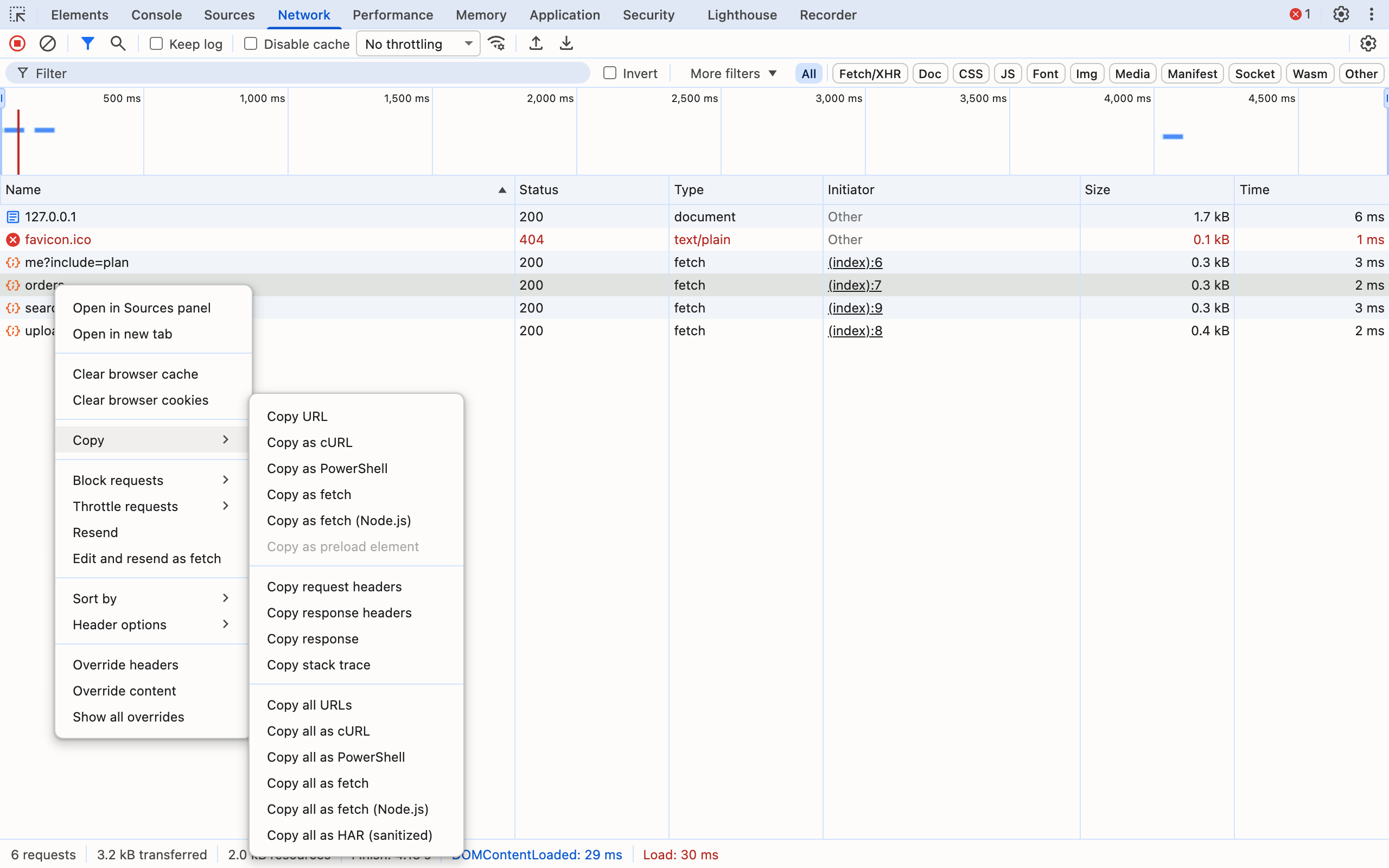
The submenu has three groups. The top group copies this request as code. The middle group copies parts of it: request headers, response headers, the response body and the initiator's stack trace. The bottom group copies every request in the list: all URLs, all as cURL, PowerShell or fetch, and a HAR file. If a filter is active, the bottom group switches to "Copy all listed as…" and only includes the requests that pass the filter. That is how you export just the API calls without fonts and images.
On Windows the menu is longer, because cURL comes in two flavors:
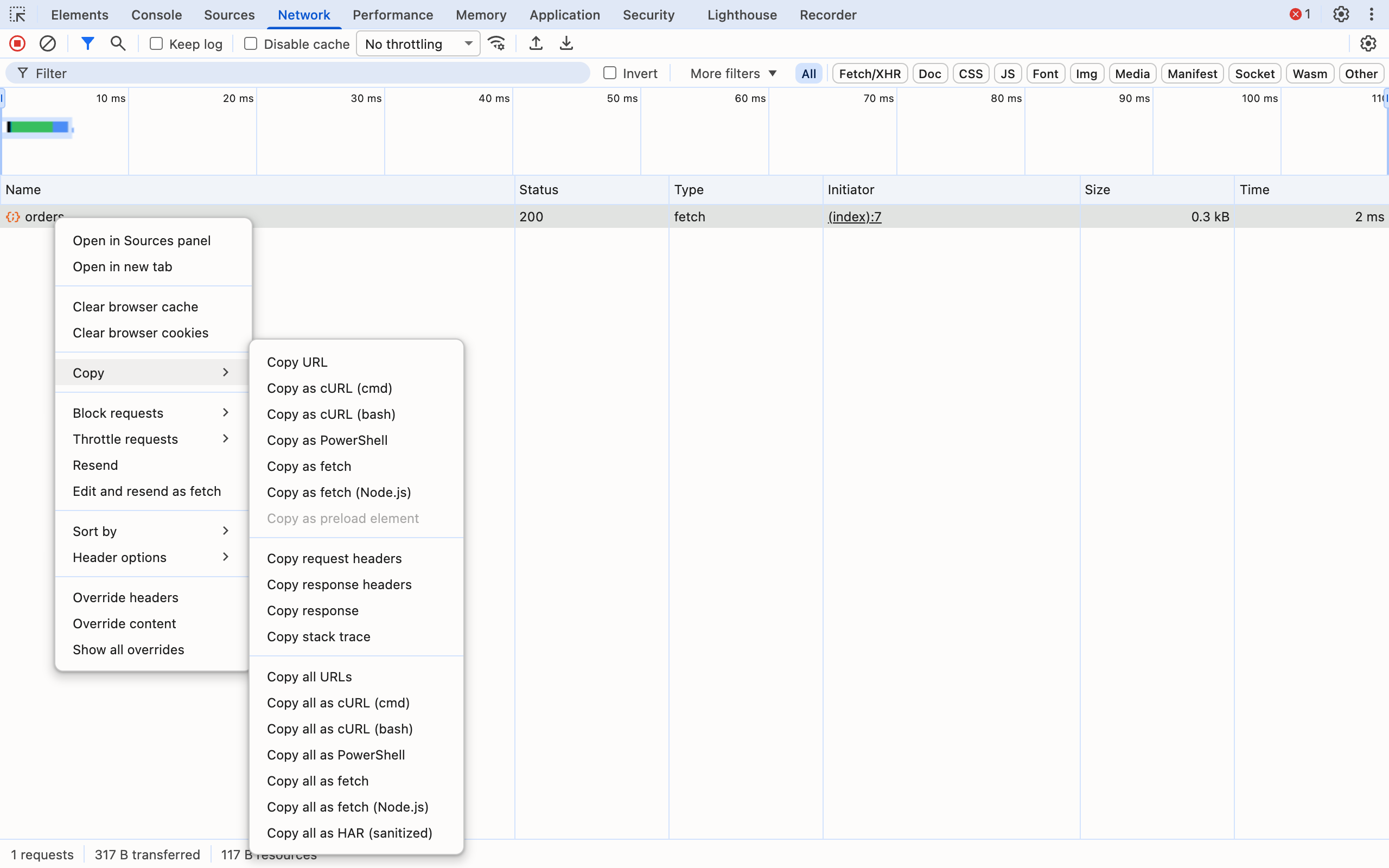
I made that screenshot on a Mac by giving the DevTools frontend a Windows user agent. The DevTools source picks the menu items from the platform, and the Mac and Linux menus show a single Copy as cURL, which is the bash version.
Every Copy Variant Compared
Here is everything in the submenu, what it produced in my test and when it is the right tool:
| Copy option | What you get | Carries cookies? | Use it for |
|---|---|---|---|
| Copy URL | The request URL only | No | Linking to an endpoint or a file |
| Copy as cURL | curl command in bash quoting | Yes, as -b | Replaying in macOS/Linux/WSL/Git Bash, bug tickets for backend devs |
| Copy as cURL (cmd) (Windows) | curl with ^ escaping for cmd.exe | Yes, as -b | Replaying in Windows Command Prompt |
| Copy as cURL (bash) (Windows) | Same output as the Mac/Linux option | Yes, as -b | WSL or Git Bash on Windows |
| Copy as PowerShell | Invoke-WebRequest with a WebRequestSession | Yes, as $session.Cookies.Add | Replaying in PowerShell |
| Copy as fetch | fetch() call for a browser console | No header; credentials: "include" | Re-running a request in the console of the same site |
| Copy as fetch (Node.js) | fetch() call for Node | Yes, as a cookie header | Scripts, tests, reproducing in Node 18+ |
| Copy as preload element | <link rel="preload"> tag | — | Preloading a font, script or image (greyed out for API calls) |
| Copy request / response headers | Header block as text | Request: yes | Comparing two requests side by side |
| Copy response | The response body | — | Saving a JSON payload as a fixture |
| Copy stack trace | Initiator call stack | — | Finding which code fired the request |
| Copy all as HAR (sanitized) | HAR JSON for every request | Stripped | Sharing a whole session with a vendor or teammate |
"Copy as preload element" was greyed out for every fetch request in my test. It only turns on for GET subresources that can be preloaded, never for the main document or for API calls.
What Copy as cURL Actually Copies
This is the command DevTools produced for a JSON POST from my test page (trimmed of the sec-ch-ua client-hint lines):
curl --url 'http://127.0.0.1:8943/api/orders' \
  -H 'Accept: */*' \
  -H 'Accept-Language: en-GB,en-US;q=0.9,en;q=0.8' \
  -H 'Authorization: Bearer tok_live_8f2c91' \
  -H 'Connection: keep-alive' \
  -H 'Content-Type: application/json' \
  -b 'session=sess_9a8b7c6d; theme=dark' \
  -H 'Origin: http://127.0.0.1:8943' \
  -H 'Referer: http://127.0.0.1:8943/' \
  -H 'Sec-Fetch-Dest: empty' \
  -H 'Sec-Fetch-Mode: cors' \
  -H 'Sec-Fetch-Site: same-origin' \
  -H 'User-Agent: Mozilla/5.0 (Macintosh; ...) HeadlessChrome/156.0.0.0 Safari/537.36' \
  --data-raw $'{"sku":"KB-87","qty":2,"note":"it\'s \\"urgent\\" & 100% real"}'
A few details matter:
- The method is implied. There is no
-X POST, because--data-rawalready makes curl send a POST. DevTools only adds-Xwhen the method is not what the body implies (aPUTorPATCHwith a body, for example). - Cookies become
-b. TheCookieheader is turned into a-bargument. That includessession, which my server set as HttpOnly. Page JavaScript cannot read that cookie, but Copy as cURL hands it to you in plain text. - Awkward bodies are handled. The body contains a single quote, double quotes,
&and%. DevTools switched to bash's$'...'quoting to escape them, and the replayed body was byte-identical. - Some headers are dropped.
Host, HTTP/2 pseudo-headers andAccept-Encodingare left out. WithoutAccept-Encoding, the server I tested sent the replay uncompressed, although the browser had received gzip.
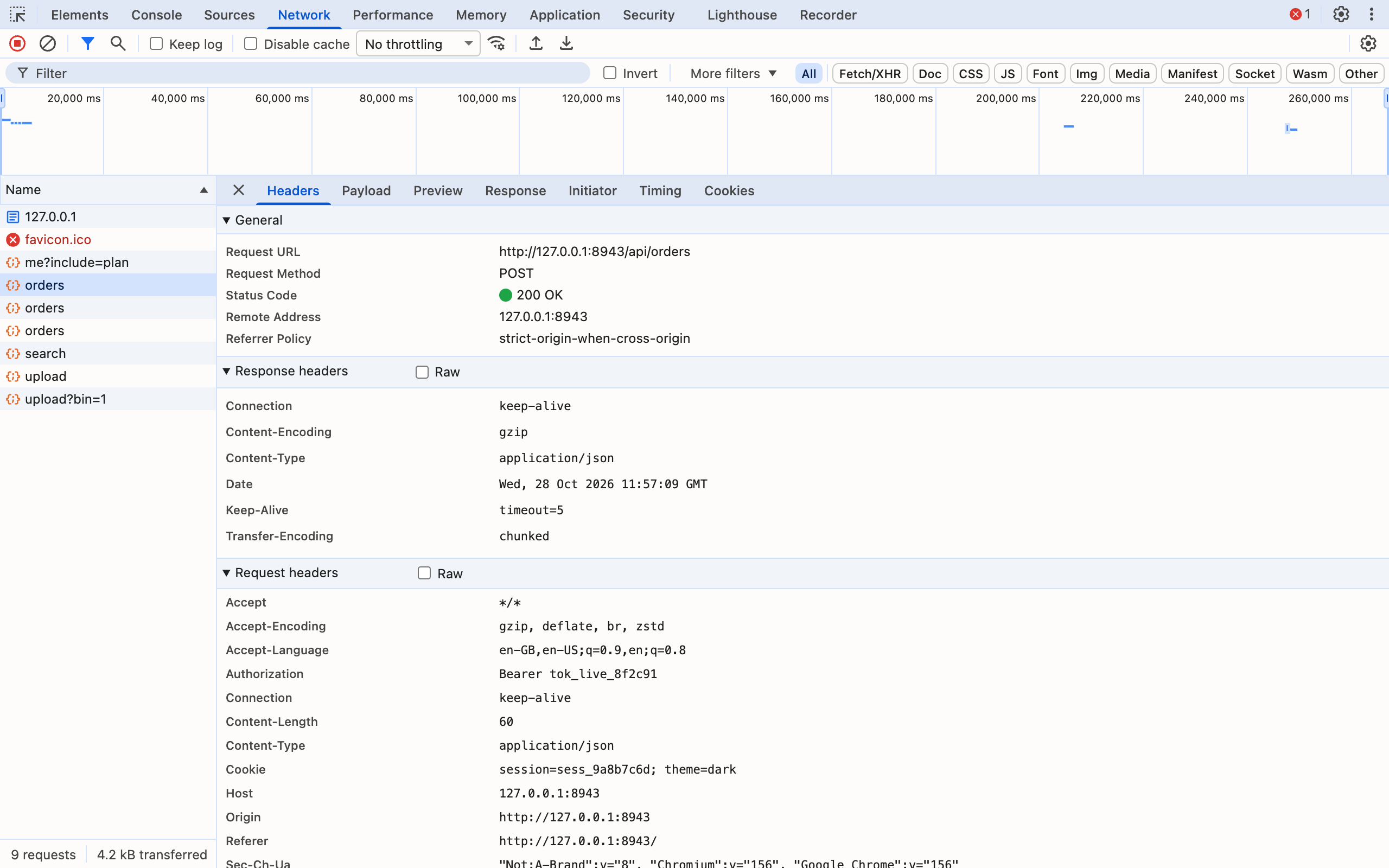
Everything you see under Request headers in that screenshot, except Accept-Encoding, Host and Content-Length, ends up in the copied command.
Replay results
I replayed four requests from the copied commands and compared what my server logged against what it had logged for the original browser requests:
| Request | Body (browser → replay) | Cookie + auth on replay | Header differences |
|---|---|---|---|
GET with Authorization + X-API-Key | 0 → 0 bytes | Both present | Only Accept-Encoding missing |
| POST JSON | 60 → 60 bytes, identical | Both present | Only Accept-Encoding missing |
| POST urlencoded form | 24 → 24 bytes, identical | Cookie present | Only Accept-Encoding missing |
| POST multipart (text file) | 304 → 304 bytes, identical | Cookie present | Only Accept-Encoding missing |
| POST multipart (binary file) | 453 → 869 bytes, corrupted | Cookie present | Only Accept-Encoding missing |
For text payloads Copy as cURL is a faithful replay. The binary case is the exception. I uploaded a file containing all 256 byte values, and every byte above 0x7F arrived as the Unicode replacement character, which nearly doubled the body. If the request uploads an image, a PDF or anything else binary, keep the headers from the copied command and replace the --data-raw part with -F 'file=@/path/to/file'.
cURL (cmd) vs cURL (bash) on Windows
The two Windows options produce the same arguments with completely different quoting. Here is the --url line and the body from the same request, as Copy as cURL (cmd) generated them:
curl --url ^"http://127.0.0.1:8943/api/orders^" ^
  -b ^"session=sess_9a8b7c6d; theme=dark^" ^
  --data-raw ^"^{^\^"sku^\^":^\^"KB-87^\^",^\^"qty^\^":2,^\^"note^\^":^\^"it's ^\^\^\^"urgent^\^\^\^" ^& 100^% real^\^"^}^"
cmd.exe has no single-quote strings, so every special character gets a ^ escape, % becomes ^% so it is not treated as a variable, and lines continue with ^ instead of \. The (bash) option on Windows produced output identical to the Mac version, character for character.
The rule is simple: use the variant that matches the shell you will paste into. Command Prompt gets (cmd). Git Bash, WSL, macOS, Linux, CI runners and almost every bug tracker reader get (bash). If you are writing a ticket and don't know where it will be run, use bash: it is the version most people can read and run. I could not run the cmd variant myself, since I tested on a Mac.
PowerShell users should skip both and use Copy as PowerShell. It builds an Invoke-WebRequest call. The user agent and each cookie go into a WebRequestSession ($session.Cookies.Add(...)), and the remaining headers go in a hashtable. It also escapes quotes with backticks, which neither cURL flavor does correctly for PowerShell.
Copy as fetch vs Copy as fetch (Node.js)
The two fetch variants look almost the same but are built for different places.
Copy as fetch is for the browser console. It removes the Cookie header and the user agent, because browsers forbid scripts from setting them. Instead it sets "credentials": "include" whenever the original request carried cookies or an Authorization header, so the browser attaches cookies from its own jar. It also sets "mode": "cors" and fills "referrer". I pasted it into the console of the same page and the server received the session cookie and the bearer token. I then ran the same code in Node 22 and the server got the token but no cookie, which is expected: Node has no cookie jar to include.
Copy as fetch (Node.js) fixes that. It removes credentials, mode and referrer and writes the cookies and Referer straight into headers:
fetch("http://127.0.0.1:8943/api/orders", {
  "headers": {
    "accept": "*/*",
    "authorization": "Bearer tok_live_8f2c91",
    "content-type": "application/json",
    "cookie": "session=sess_9a8b7c6d; theme=dark",
    "Referer": "http://127.0.0.1:8943/"
  },
  "body": "{\"sku\":\"KB-87\",\"qty\":2,\"note\":\"it's \\\"urgent\\\" & 100% real\"}",
  "method": "POST"
});
In Node 22 that replay arrived with the cookie, the token and the identical 60-byte body. Use it to turn one request into a test or a script. The closely related context-menu item Edit and resend as fetch puts the browser-style fetch call into the Console prompt as await fetch(...), with headers that a page script cannot set commented out, ready to edit and run. That is usually faster than copying it when you only want to change one field and resend. If you need to watch the request under bad network conditions while you do that, the network throttling guide covers the presets.
Copy All as cURL, fetch and HAR
The bottom group of the menu copies the whole request list at once. "Copy all as cURL" joins one command per request with ; between them, so the result runs top to bottom as a script. "Copy all as fetch" does the same with fetch() calls. Requests to blob: URLs are skipped, and the single-request items are disabled on them, because a blob only exists inside that tab.
The most useful bulk option for collaboration is Copy all as HAR (sanitized). HAR is the JSON format that browsers, proxies and many vendor support teams read. I checked what "sanitized" removes in my copy:
| Item | In the sanitized HAR? |
|---|---|
Authorization request header | Removed |
Cookie request header and the parsed cookie list | Removed |
Set-Cookie response header | Removed |
Custom X-API-Key request header | Kept |
| POST bodies (JSON, form, multipart) | Kept, in full |
| Tokens in the URL query string | Kept |
| Response bodies | Not included in my copy (size and type only) |
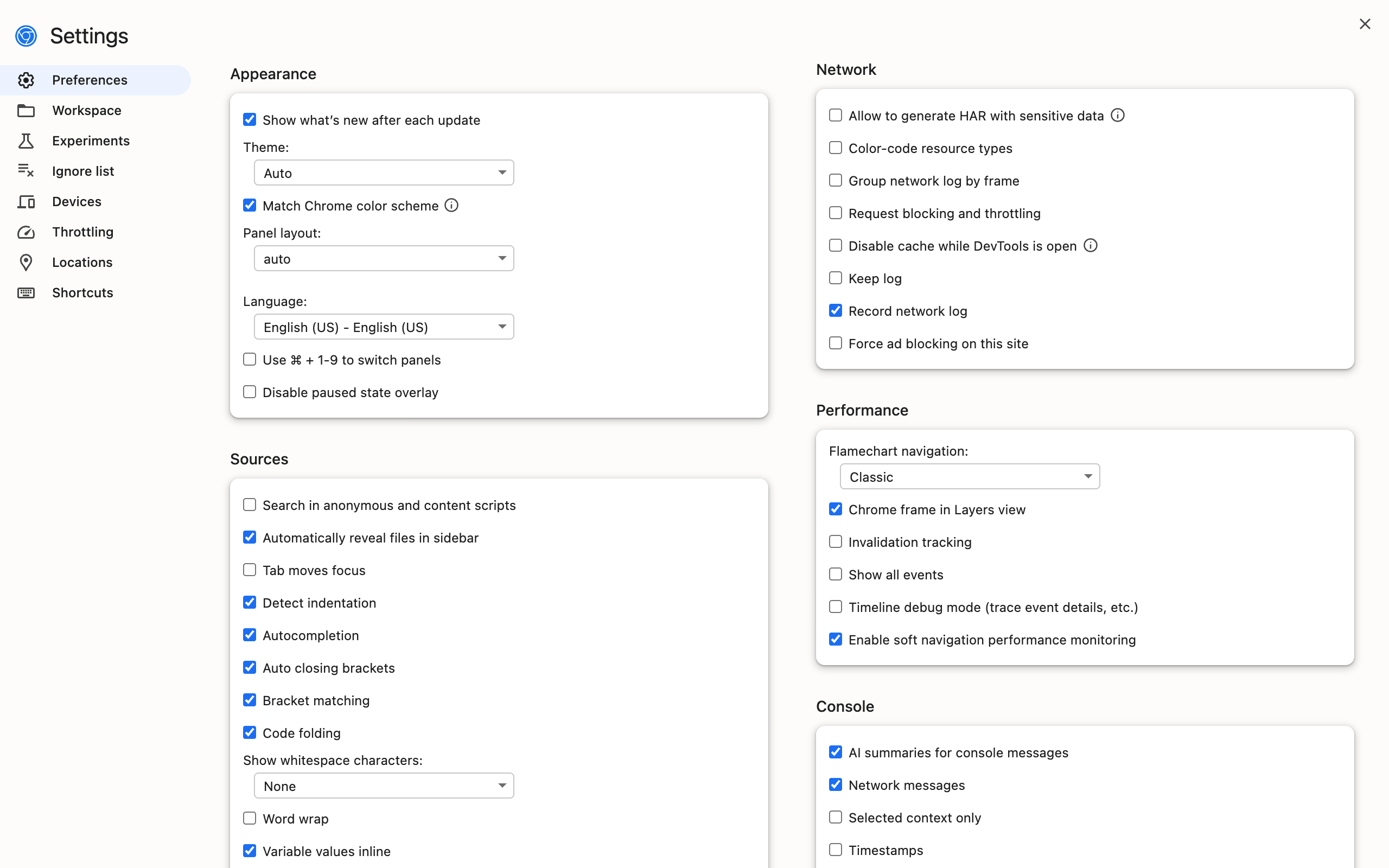
The unsanitized version is hidden on purpose. It only appears as "Copy all as HAR (with sensitive data)" after you tick Allow to generate HAR with sensitive data under DevTools Settings → Preferences → Network. When I ticked it, the new item showed up at the bottom of the Copy submenu. Leave it off unless you are debugging an auth problem yourself.
Redact Secrets Before You Paste
A copied cURL command is a working login. Anyone who runs the one above becomes me until the session expires. Bug trackers, Slack channels and AI chat windows are all more widely read than the app you are debugging, so redact before you paste:
- Cookies (
-b '...'). Delete the whole-bargument unless the bug is about cookies. Session cookies are the most valuable thing in the command, and HttpOnly gives no protection here. Authorizationheaders. Replace the token withBearer <redacted>. Do the same for thecookieheader in Node.js fetch output and for$session.Cookies.Addlines in PowerShell output.- Custom auth headers. Look for
X-API-Key,X-Auth-Token,X-CSRF-Tokenand anything vendor-specific. DevTools has no way to know these are secrets, and even the sanitized HAR keeps them. - The URL and the body. Signed URLs,
?token=parameters, passwords in login bodies and personal data in JSON payloads all survive every Copy option, sanitized HAR included. - Noise. The
sec-ch-ua*andSec-Fetch-*lines are almost never relevant and make tickets hard to read. Cutting them makes the secrets easier to spot.
A good habit is to replay the redacted command once yourself. If it still reproduces the bug with a placeholder token (for example, a 401 that should have been a 403), the ticket is self-contained. If it needs the real token, write "requires a valid session" in the ticket instead of pasting one. Copying the page URL into bug reports covers the other half of a good ticket.
Faster Ways to Reach the Copy Menu
Right-clicking is the only way to reach the Copy submenu, but the steps before it can be faster:
- Type in the Network panel's Filter box (for example
api/ormethod:POST) so the request you need is near the top. The "Copy all listed" items then only export what is visible. - Tick Keep log (formerly "Preserve log") when the request happens just before a redirect, or the row disappears before you can right-click it.
- Use the DevTools command menu (
Ctrl+Shift+P/Cmd+Shift+P) to jump to the Network panel or toggle panel settings without hunting through tabs.
For more DevTools habits that save minutes every day, see the Chrome DevTools tips and tricks hub.
Frequently Asked Questions
How do I copy a request as cURL in Chrome? Open DevTools, go to the Network panel, trigger the request, right-click it in the request list and choose Copy, then Copy as cURL. On Windows the menu offers two versions: Copy as cURL (cmd) and Copy as cURL (bash).
Does Copy as cURL include cookies and the Authorization header?
Yes. In my Chrome 156 test the copied command carried the Authorization bearer token, a custom X-API-Key header and every cookie, including an HttpOnly session cookie, as a -b argument. Treat the copied command as a password.
What is the difference between Copy as fetch and Copy as fetch (Node.js)?
Copy as fetch is meant for a browser console: it drops the Cookie header and sets credentials: "include", so the browser attaches its own cookies. The Node.js version has no credentials option and writes the Cookie and Referer headers into the code, because Node has no cookie jar.
Why does my copied cURL command return different data than the browser? Usually because the session in the command expired, or because the request depends on state the command cannot carry. Chrome also drops the Accept-Encoding header, so the server answers uncompressed, which matters only if the bug is about compression.
Is Copy all as HAR (sanitized) safe to share? Safer, not safe. It removes Cookie, Set-Cookie and Authorization headers, but in my test it kept a custom X-API-Key header and every POST body. Check the file for custom tokens before sharing it.
Can Copy as cURL replay file uploads?
Text multipart uploads replayed byte for byte in my test. Binary uploads did not: a 453-byte upload came back as 869 bytes because non-text bytes were replaced. For binary files, rewrite the command with curl -F and the real file path.
Copy as cURL captures the request. The ticket usually also needs the page it came from. Ctrl+Shift+C copies the current tab's URL with one shortcut, with no address bar trip and no data collected. It is the fastest way to put the page next to the command.
Try Ctrl+Shift+C
Copy any URL with one keyboard shortcut. Free forever, no data collected.